
-
Microsoft System Center Configuration Manager 2007 R2 Overview (Part 1) (70-401)
Posted on March 1, 2013 by Michael in Latest News, Studying, Tutorials
Well here we are again, another exam to study for which means a whole new load of topics to revise!
In terms of the 70-400, I have now passed the exam BUT I must admit I haven’t done any of the write up’s yet purely due to a time issue, so with the 70-401 I’m going to do my best to try and keep it updated as possible!
Anyway enough about that and on with this “new” topic.
System Center Configuration Manager (or SCCM as i’ll be referring to it), essentially allows the configuration and management of end points with agents installed on them. In relation to SCOM (which does the monitoring) SCCM is used for the configuring.
Before we go any further, it’s best to get your home lab built. In this example I am going to be using three virtual machines, all located in the same Active Directory Forest and single domain.
- Domain: Riccioni.ad (Both Forest and Domain functional level 2008 R2)
- MRDC02 – Domain Controller – 192.168.5.30 (Windows Server 2008 R2)
- MRSCCM01 – SCCM 2007 Server – 192.168.5.31 (Windows Server 2008 R2)
- MRPC01 – End User PC01 – 192.168.5.40 (Windows 7 Enterprise SP1)
You may wonder why the DC is called MRDC02, that’s because MRDC01 sit’s on my ESXi host, and for the following blogs i’m simply running the VM’s off my desktop computer.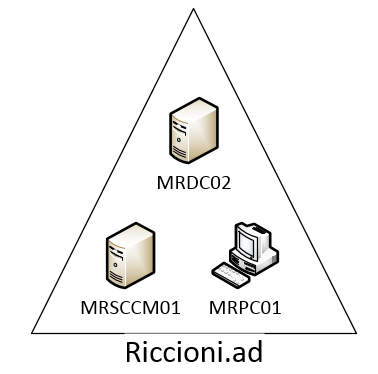
With that out the way lets gone on with finding out about SCCM 2007.
Gone are the days of walking round each machine in your network with a CD (or floppy disks!) installing software.
Now in a lot of cases, administrators will install software via GPO which references a network shares with stored ISO’s or Executable’s (EXEs) or via logon scripts.
Most companies also have standard “deploy-able” images which contain’s (a usually) up to date image of (for example the Windows 7 Operating System) with all the latest relevant patches, commonly used software, and customisation’s.
To be honest this is nothing new, many people have been doing this for year as a manual process so why bother with SCCM at all?
Well SCCM provides you with a more centrally manageable “overview” of what is being deployed, installed, controlled within your network.
Features such as:
- patch management
- software distribution
- operating system deployment
- network access protection
- hardware and software inventory
To name a few.
If you are the sole administrator in charge of 100 end points, then you will be grateful for SCCM!
I can’t really go in to too much more detail as like you i’m only just touching the surface with SCCM, and i’m hoping the next few blogs will help us all to understand SCCM in greater depth.
For now however, I’ll leave you with the basics, and will see you in Part 2!